


The Home Depot
4.4102.29K Reviews
App Specs
- Version
- 8.0.5
- Updated On
- License
- Free
- Downloads
- 10,000,000+
- Developer
- The Home Depot, Inc
- Categories
- Shopping
- Platform
- Android, iOS
Screenshots



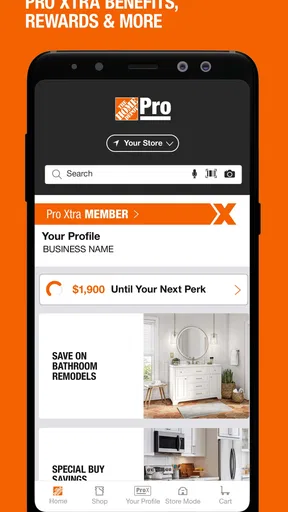
 Analysis by AppCompare
I find the most useful way to approach The Home Depot app is as a planning companion for a store trip, not just a smaller version of a hardware aisle. It can help me identify a product, check a nearby store, and keep a purchase moving, but the best results still come from knowing what I need and checking the details before I commit. That balance matters when one wrong fitting or tool can turn a quick errand into a second trip.
A reliable workflow starts before the aisle
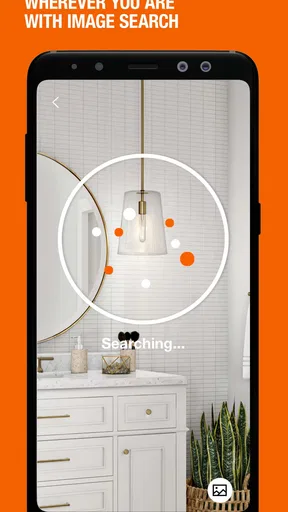
For a familiar item, I begin with a text search and narrow down what I’m looking for before heading out. For an unfamiliar part, image search can be a useful first clue: it gives me a place to start when I do not know the right name. I would still compare the result with the old part, its measurements, and the product details rather than treating a photo match as proof. A picture can help identify a likely category, but it cannot tell me whether a fitting will work with my particular setup.
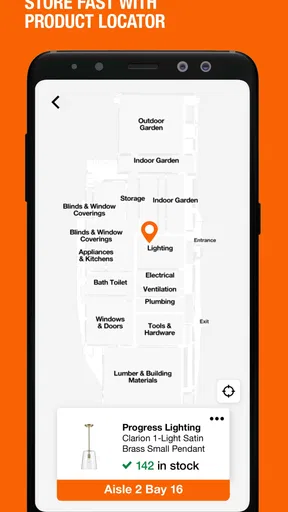
Once I have a candidate, I check the selected store and its stock information before making the trip. That small pause is especially worthwhile for bulky materials, a specific replacement part, or anything needed to finish a job that day. If I need to see an item in person, the store locator makes it easier to choose a nearby location and check availability there. I use that information as a planning aid, not a guarantee that the item will still be waiting when I arrive.
A practical example: if a cabinet hinge breaks on a weekday, I can photograph the hinge, search for a likely match, and check a local store before leaving home. I would take the original hinge along too, then compare its shape and fixing points with the product in person. That combination is more dependable than relying on a search result alone, and it can save time without pretending that the app replaces careful measuring.
Settings and choices worth checking
Store selection is one of the first choices I pay attention to. A product may appear in search, but the useful question is whether the location I can actually visit has it. I check the store shown in the app before I plan around availability, especially if I have searched while away from home or previously looked at another branch. Keeping the intended location in view makes search and pickup decisions less confusing.
I also choose the buying method based on the job rather than habit. In-store pickup suits a planned list when I want to collect several items together; delivery is more appealing when carrying materials would be awkward. Before ordering, I review the item, quantity, and selected option in the cart. That is a simple safeguard against ordering the wrong size or buying a single piece when the project needs more.
The app is free, and its Everyone age rating makes clear that it is presented for a broad audience. The Home Depot, Inc. develops it; it has a 4.6 average from around 870,000 ratings, with over 10 million installs. Those figures suggest it is widely used, but I would judge it by whether its store and product information fit my own shopping routine. It is listed as version 7.56, and requires Android 8.0 or later.
Worth Reading Before You Choose

EA SPORTS FC Mobile 26 Is a Bigger Football Game, but It Takes Time

Flipboard Shows What News Apps Must Do Beyond the Feed

Switching to Android Auto Means Rethinking Your Driving Routine

Google Calendar Makes a Crowded Week Easier to Manage

Ludo King Makes the Most of the Minutes Between Plans

Baby Panda World Brings Quick Play to Modern Phones, but Its Game Library Feels Busy
Making repeat shopping faster
When I have a multi-step project, I use a repeatable routine: search for each item, confirm the store, then review the cart as a complete list before checkout. This is more useful than adding things in a rush as I remember them. It also gives me a chance to spot mismatched sizes or duplicate supplies before I set off. For a recurring household need, repeating the same checks can make a future run feel much less improvised.
Search by voice can help when typing is inconvenient, while image search is handy when I have an object but not its name. I treat both as alternate routes into the catalog, not as replacements for checking specifications. If a product has several versions, I read the details and compare them with the job at hand. That extra step is particularly important for hardware, where small differences can decide whether a part fits.
Where it fits among shopping options
Compared with a general shopping app, this one is most useful when I already intend to shop at The Home Depot: its store locator, local stock checks, pickup choice, and order tracking connect the online search to a physical store visit. A general marketplace may be a better place to compare a broader range of sellers or brands, while a visit to a store remains the better option when I need to handle an item or ask someone to help identify it. I see the app as a bridge between those choices, not a universal answer for every purchase.
It is a particularly good fit for homeowners, renters handling small repairs, and DIY shoppers who want to prepare before leaving home. It is less compelling if I only need a one-off item from another retailer, prefer to browse shelves without using a phone, or need certainty that depends on physically checking a product. And while project ideas can help me get started, I would not use inspiration alone as a substitute for a plan, accurate measurements, or appropriate guidance for a complex job.
Useful limits to keep in mind
The main trade-off is that convenience depends on getting the details right. Search results can point me toward a likely item, but product compatibility still takes judgment; stock information can help me choose a store, but I plan for the possibility that circumstances change. Pickup is smooth when the order and location are correct, yet it is not a shortcut around reviewing the cart. I also avoid treating app-only offers as the reason to buy: a discount is useful only when the product already suits the project.
For larger jobs, I break the shopping into stages instead of assuming one cart will solve everything. I identify the materials I can specify confidently, verify those against the job, and leave uncertain choices for an in-person check or a conversation with a knowledgeable person. This keeps the app in its strongest role—organizing a purchase—without asking it to make technical decisions for me.
Getting Started with the App
First off, downloading the app is a breeze. Whether you're an Android user or rocking an iPhone, you can find it easily in the Google Play Store or the App Store. Once installed, you're greeted with a crisp interface that’s intuitive and user-friendly. It's like having a mini Home Depot right in your pocket!
Features That Stand Out
One of the standout features is the product search. You can search by voice, image, or simply type in what you're looking for. Using the image search, I snapped a pic of a random bolt I had lying around, and presto! The app pulled up exactly what I needed. Pretty cool, right?
Another handy feature is the store locator. If you're like me and sometimes need to see a product in person before committing, this feature will be your best friend. It’ll show you the nearest Home Depot locations and even let you check if a product is in stock at a particular store.
Project Planning and Ideas
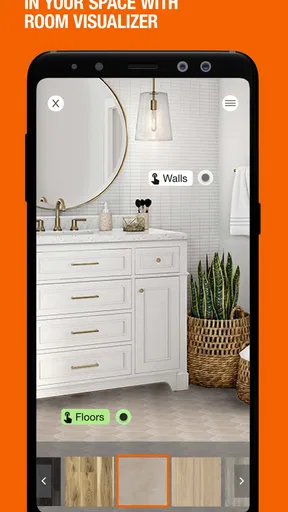
For all you DIY enthusiasts, the app offers a plethora of project ideas. Whether you're planning a small weekend project or a major home renovation, the app has tons of guides and tutorials to help you out. I found myself scrolling through endless project ideas, dreaming of my next big home improvement adventure.
One useful way I’d pair those ideas with shopping is to turn browsing into a short, concrete plan. Before adding anything to a cart, I write down the project’s purpose, the measurements I already know, and the materials I still need to verify. That prevents an appealing project guide from becoming an unexamined shopping list. For a simple refresh, the ideas can help me decide what to tackle; for work involving electrical, structural, or other safety-sensitive details, I would seek appropriate guidance instead of treating an app tutorial as a complete specification.
Shopping Made Easy
Shopping through the app is straightforward. You can add items to your cart with ease and choose between delivery or in-store pickup. I opted for the in-store pickup, and it was seamless. I showed up, and my order was ready to go. Plus, they offer special app-only discounts, so keep your eyes peeled for those.
For a time-sensitive errand, I find it helps to separate “must have today” items from supplies that can wait. I check the critical item’s store availability first, then decide whether it makes sense to add the rest of the project list to the same order. That keeps a low-priority extra from complicating a quick repair run. If I choose pickup, I make sure I have the right location in mind and keep the order details accessible; if I choose delivery, I consider whether the items are practical to receive at home.
One thing I absolutely love is the order tracking. Once you’ve made a purchase, you can track your order status right from the app. It’s like having your own personal project manager keeping tabs on everything.
A better fit for some shoppers than others
The app is most valuable when The Home Depot is already part of my plan and I want to connect browsing with a real store visit or an order. Someone tackling regular repairs can use the same search-and-check routine for each errand, while a first-time DIYer may appreciate having product discovery and project inspiration close together. It is also handy when I know the item by appearance but not by name, provided I treat visual search as a lead to investigate rather than a final compatibility check.
On the other hand, I would skip it for a purchase that is easier to make at a nearby specialist, for a product I need to inspect closely before deciding, or when I am comparing options across many retailers. A store visit is better if touch, fit, or finish is central to the decision. A broader marketplace may be more useful for comparing sellers, while this app’s advantage is the connection to Home Depot locations and shopping options.
Across its shopping tools, the app does a good job of reducing avoidable uncertainty, not removing it altogether. I still need to know the dimensions, material, or intended use that matter for my project, and I still check the final selection before buying. That is why I see a repeatable habit—not a clever shortcut—as the real efficiency gain: identify, verify, choose a store or delivery, and review the order.
Final Thoughts
All in all, the The Home Depot app is a fantastic tool for anyone looking to streamline their shopping experience. It's packed with features that cater to both casual shoppers and hardcore DIYers. Whether you're hunting for a specific tool or just browsing for inspiration, this app has got you covered.
So, if you haven’t already, go ahead and give it a download. Trust me, your future projects will thank you!
My recommendation is straightforward: I would keep it on my phone if I shop at The Home Depot often, manage repairs, or like to check a product before making a trip. I would not rely on it as the sole authority for technical fit, guaranteed availability, or project safety. Used with measurements, sensible comparisons, and an in-person check when needed, it makes the path from “I need this” to a prepared store visit noticeably easier.
Pros
- User-friendly interface for easy navigation.
- Extensive product range available online.
- Convenient order tracking feature.
- Frequent promotions and discounts.
- Loyalty rewards program for regular customers.
Cons
- App performance can occasionally be slow.
- Limited payment options available.
- In-store inventory may differ from online.
- Some users report login issues.
- Customer service response times vary.
FAQs for The Home Depot
What is The Home Depot app, and what can I do with it?
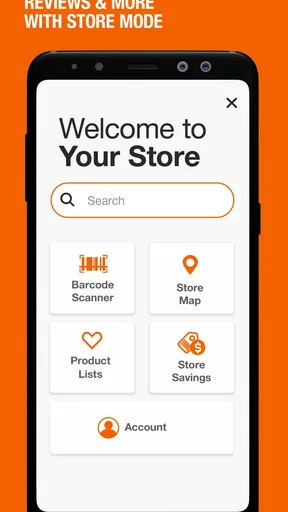
The Home Depot app is a comprehensive tool for shoppers and DIY enthusiasts, offering features such as product search, store locator, and inventory checks. Users can browse thousands of products, access detailed product information, check availability in local stores, and make purchases directly through the app. It also includes features like barcode scanning and personalized shopping lists.
How user-friendly is The Home Depot app for new users?
The Home Depot app is designed with user-friendliness in mind, featuring an intuitive interface that makes navigation easy for beginners. The app includes clear categories, a powerful search function, and helpful tooltips to guide users through their shopping journey. Additionally, customer reviews and ratings enhance decision-making, making it accessible even for those new to online shopping.
Can I use The Home Depot app for in-store shopping assistance?
Yes, The Home Depot app provides several tools to enhance the in-store shopping experience. Users can find aisle locations for products in their selected store, scan barcodes for detailed product information, and check real-time inventory. The app also offers the ability to create shopping lists and view product availability, making in-store visits more efficient.
Does The Home Depot app offer any special deals or promotions?
The Home Depot app regularly features exclusive deals and promotions, including discounts and special offers not available elsewhere. Users can enable notifications to stay informed about the latest sales, and the app often highlights seasonal promotions and clearance items, providing significant savings opportunities. Loyalty rewards and credit card offers may also be available.
Is The Home Depot app secure for online transactions?
The Home Depot app prioritizes user security, employing advanced encryption technology to protect personal and payment information during transactions. The app is regularly updated to address security vulnerabilities, and users can set up biometric authentication for an added layer of protection. Secure payment options, such as credit cards and PayPal, are supported to ensure safe purchases.


